


While there is no official standard size for posters, over the decades many printing and advertising companies have been using the same consistent sizes for poster printing.
This resource discusses the dimensions and rules that are commonly used for printing posters worldwide. Using the dimensions in this guide will assure your poster printing project will turn out to be a success - no matter what printing company you choose.
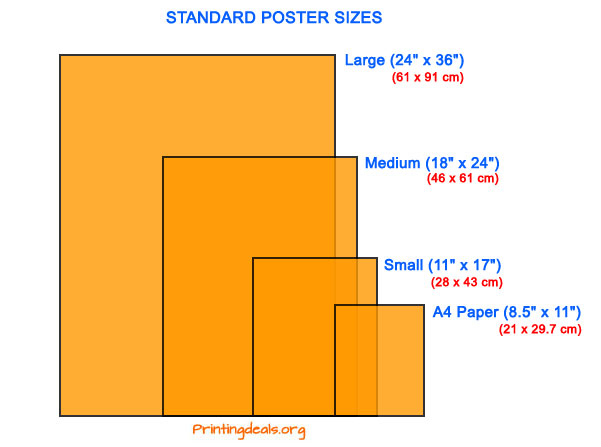
Also called Ledger, Tabloid or ANSI B size. This is the smallest standard poster size, they are mostly used for flyers, street lights, bulletin boards, and generally putting up on businesses without taking up too much room and offending. These also work great with a minimalist approach to text. Big letters big message. Size in Millimetres is 279 x 432mm.
Also called Architectural C size - A little more information can be displayed on this standard poster size. I would still recommend some minimalism and little text. These posters are mainly seen as small adverts on university residence floors, doctor's offices, construction walkways and bulletin boards. Size in Millimetres is 457 × 610mm.
Also called Architectural D Size - This is the most common standard size for posters. These posters are used for most applications including outside of events, trade shows, and malls. Also widely used for small movie posters delivered to fans and posters for decoration like in University residences and outside a pub or club. With these types of posters you will be grabbing attention with a large message and you can include further details in small writing so after the message is received people can choose whether to come closer and learn more. Size in Millimetres is 609.6 mm x 914.4 mm.
Note: If you are designing a poster you cannot go wrong by using the dimensions that we described above, they are used by printing companies worldwide. Don't be afraid to work with different dimensions though: Posters are printed on rolls of paper (not on sheets) and can therefore be cut in any other dimension. If you want create a poster larger than 24 x36 Inch be sure to contact your printer first, and confirm that he is able to print your desired size.There are 2 different dimensions for movie posters that the film industry has standardized. Both are typically in portrait format:
The "One-Sheet" size is used in the official advertising for films.
Both are typically printed on paper stock and usually rolled for aesthetic reasons.
Be aware that the mentioned dimensions for film posters are approximate, and do not have to be exactly in the sizes mentioned above.
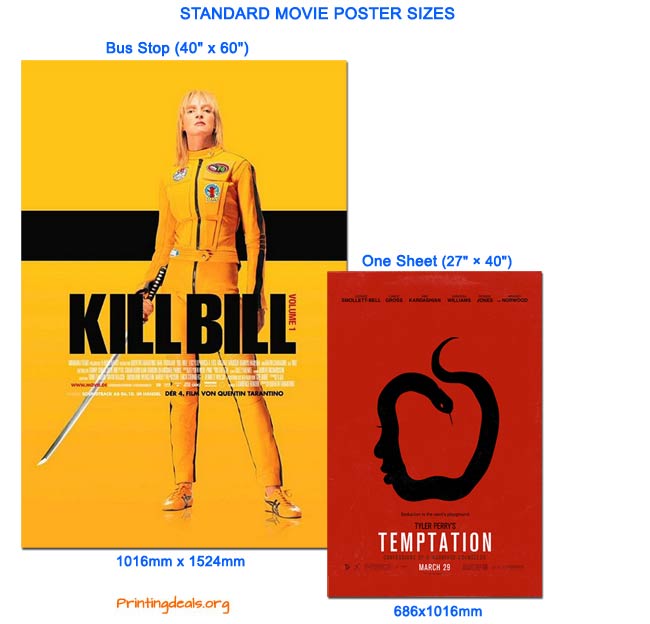
Note: Film posters sold in retailing are in poster size, which is 24 x 36 inches.
Common landscape (horizontal oriented) format movie Posters also called HALF-SHEET measure 22" x 28", and are generally printed on thicker stock paper.
For further in-depth information about movie poster sizes visit Cinemasterpieces and Wikipedia.
Choosing the right paper to print your posters is essential. The first thing to note is: Always use Acid free paper for poster printing. You do not want your printed poster to turn yellow after a while, therefore the papers you use for printing should be acid free.
The best stock to use for your poster depends on many factors, that are not defined by hard rules.
These factors include:
As a rule you want to make sure to use stock that is heavier (thicker) then default printer papers.
Not only does this add durability to your poster, it will age much better then standard paper, and your poster is much easier to flatten.
We recommend to choose paper weight of at least 60lbs (90 g/m2) or above for your poster project. This really is the minimum weight you should choose for (bulk) production.
If your budget allows it, preferably choose heavier papers like (80 lbs - 120 g/m2 or 90 lbs - 163 g/m2). This will give your poster a more luxurious feel and will add longevity to your poster.
When creating your own poster make sure to create your document in CMYK mode in 300DPI and set a healthy amount of bleed around the edges so that essential pieces of the poster are not cut off after the printing. For more information read our printing guide to avoid common printing mistakes.
 Pascal Smits is an expert in graphic design, print quality accuracy, product analysis and production process. With a background in print process management and printer development, Pascal is an all round expert.
» Free downloadable high-res Vintage posters for printing.
» Reviews of the best poster printing services.
Hello, I called customer service a few days ago with questions regarding the wedding cards I was attempting to order. A customer service representative by the name of Samara, not only navigated me through the site but informed me how to change colors, fonts, where to find offers, how and where to request the quick shipping (fasting shipping) and information on how to ask the designer for minor changes. She was extremely efficient, professional, knowledgeable, competent and friendly. Like I stated to her, I am extremely stress prone so to have such a pleasant experience and smoother process with ordering my wedding invites, that call truly made my week! I will be referring any and all contacts to order from this company, as she was just so helpful and resolved all my issues.
 Rating: 5 / 5
I have been using Printing for Less for years and I always know I will get excellent service. After graduating college I started my own clothing business and these guys created the perfect catalogues for me.
Im not a graphic designer, and I didn't know where to start so I gave them a call; they advised me what type of photos to take, how the text should be designed and were extremely helpful in the whole process. Highly recommend!
Rating: 5 / 5
Many times you read negative reviews about companies online. I guess people do not take the trouble of leaving a good review when they are happy, so with the Christmas Spirit in mind i want to let everyone know that Printplace offers a great service and really nice print quality. I ordered posters from them and now im back for ordering Flyers.
Rating: 5 / 5
Im not happy with Cafepress: I ordered a long sleeve tee shirt, but the design was off center. The print is shifted to the left of the shirt instead of centered. Also the fabric is low quality, the shirt already has a hole in the front.
 Rating: 2 / 5
Typical large company: it's impossible to speak to a human besides someone in a call-center who knows nothing about printing!! Result: crap useless business cards. Used vistaprint to save money: in the end it costed me money, time and aggravation.
Rating: 2 / 5
Copyright © 2026 - Printingdeals.org

