


When discussing Business card sizes the first thing to note is: there is no set standard for business card dimensions.
Business card sizes in fact vary from country to country.
In most countries business card shapes and sizes also vary outside the standard range (from micro-business card at just 1 by 3 inches, to square and foldable business cards). As a designer you have freedom in choosing the shape and size you wish to use.
This resource will discuss the standard (most commonly used) sizes by country only.
In the USA and Canada standard business card size is 3.5 inches by 2 inches (88.9mm x 50.8mm).
Setup your US business card in Photoshop at 300 PPI the document size is 1050 pixels x 600 pixels.
For easier storage with banking cards the standard business card size in Europe is 85mm x 55mm.
3.346 x 2.165 inches) Size in Pixels at 300 PPI for EU cards = 1004 pixels x 650 pixels.
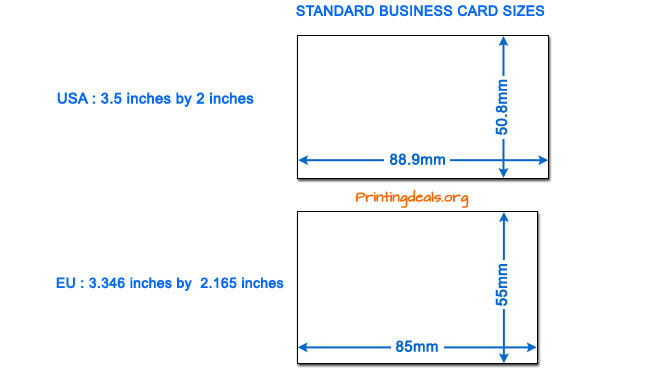
Standard business card size for USA and Europe.
The table below lists the standard dimensions for business cards used by country.
| Standard | Size in Millimeters | Size in Inches | ||
|---|---|---|---|---|
| ISO 7810 ID-1 | W: 85.60 | H: 53.98 | W: 3.370 | H: 2.125 |
| ISO 216 - A8 sized | W: 74 | H: 52 | W: 2.913 | H: 2.047 |
| Australia | W:90 | H:55 | W: 3.543 | H: 1.968 |
| United States | W: 88.9 | H: 50.8 | W: 3.5 | H: 2 |
| Canada | W: 89 | H: 51 | W: 3.5 | H: 2 |
| China | W: 90 | H: 54 | W: 3.543 | H: 2.125 |
| Czech Republic | W: 90 | H: 50 | W: 3.543 | H: 1.968 |
| France | W: 85 | H: 55 | W: 3.346 | H: 2.165 |
| Germany | W: 85 | H: 55 | W: 3.346 | H: 2.165 |
| Hungary | W: 90 | H: 50 | W: 3.543 | H: 1.968 |
| Italy | W: 85 | H: 55 | W: 3.346 | H: 2.165 |
| Netherlands | W: 85 | H: 55 | W: 3.346 | H: 2.165 |
| Japan | W:91 | H:55 | W: 3.582 | H: 2.165 |
| Russia | W: 90 | H: 50 | W: 3.543 | H: 1.968 |
| Scandinavia | W: 90 | H: 55 | W: 3.54 | H: 2.165 |
| Slovakia | W: 90 | H: 50 | W: 3.543 | H: 1.968 |
| Spain | W: 85 | H: 55 | W: 3.346 | H: 2.165 |
| Switzerland | W: 85 | H: 55 | W: 3.346 | H: 2.165 |
| United Kingdom | W: 85 | H: 55 | W: 3.346 | H: 2.165 |
Aspect ratios range from 1.42 to 1.8.
Quick Tip: Need great looking business cards? Check out our reviews of the best business card printing services.
When designing business cards, pick the correct dimension for the corresponding country from the table above and do not forget to add bleeds to your document.
A bleed refers to printing that goes beyond the edge of the sheet before trimming. In other words, the bleed is the area to be trimmed off.
To prevent white edges or parts of your being design cut off by the blade in the cutting process it is essential that you add bleeds on all 4 sides of your document before sending it to the printer.
Bleeds are typically an extra 3.175 mm (1/8 inch) to 6.35 mm (1/4 inch) to all sides of the card.
When creating your business card, always add a bleed on 4 sizes, and use a resolution of 300 ppi. The list below shows your document size including bleed:
For USA cards:
For European cards:
For a folded business card with bleed the document should be 3.75 inches x 4.25 inches - Generally these cards will fold to the standard size.
Business cards are printed on heavy card stock, generally the rule is to use stock that is at least 350 g/m2 (density), 45 kg (100 lb - weight), or 12 pt in thickness.
The stock you choose may depend on various variables: the printing method, the desired visual effect, the available budget and other organizational norms or preferences.
We strongly advise to use stock that is at least 350 g/m2 or heavier for professional looking business cards.
 Pascal Smits is an expert in graphic design, print quality accuracy, product analysis and production process. With a background in print process management and printer development, Pascal is an all round expert.
» Inspirational Business Card designs.
» NFC Business Cards 101 - Everything you need to know about NFC Business Cards.
» Reviews of the best business card printing services.
Moo businesscards rock! Only downside is their price. Previously i ordered from a local printshop that was slightly cheaper but not even close to Moo's quality and luxurious feel
 Rating: 5 / 5
I placed several orders with Vistaprint before, and was a satisfied customer until recently. I needed Christmas cards quickly so i paid extra for rush delivery (which takes 3 days). Now we are 15 days later and i still didn't receive the cards that i needed urgently. There is no phone number to contact them, only an Email address where you have to wait for days to get a reply. Finally their reply was unsatisfactory and i still have nothing. They do make you pay upfront, but no delivery and no customer support. Vista print: never again for me!
 Rating: 1 / 5
Love the swift delivery! I needed my order delivered fast and I got what I wanted. No further comments. A+!
Rating: 5 / 5
Tiny Prints did not deliver my order by the delivery date, even though I paid for super rush delivery. The did not contact me to say anything was holding up my order. The auto message when you call even said they weren't experiencing delays and all orders were being sent on time. Two different Tiny Print reps aid I would get the order the following day. When I called again to question that, because it was the night before the new delivery date and they still hasn't printed yet, they admitted after some questioning that I would not receive the order the next day. I wasted hours creating the invitation on Tiny Prints and now need to start over with someone else because Tiny Prints has false advertising, poor customer service, and claim copyright issues for not sending me the file to go elsewhere.
Rating: 1 / 5
Printingforless is my favorite online printer. Thanks for sharing these wonderful discounts!
Rating: 5 / 5
Copyright © 2026 - Printingdeals.org

